
The Complete Guide to AI Jewelry Design in 2026
The product page for AI jewelry design in Diatech Studio.
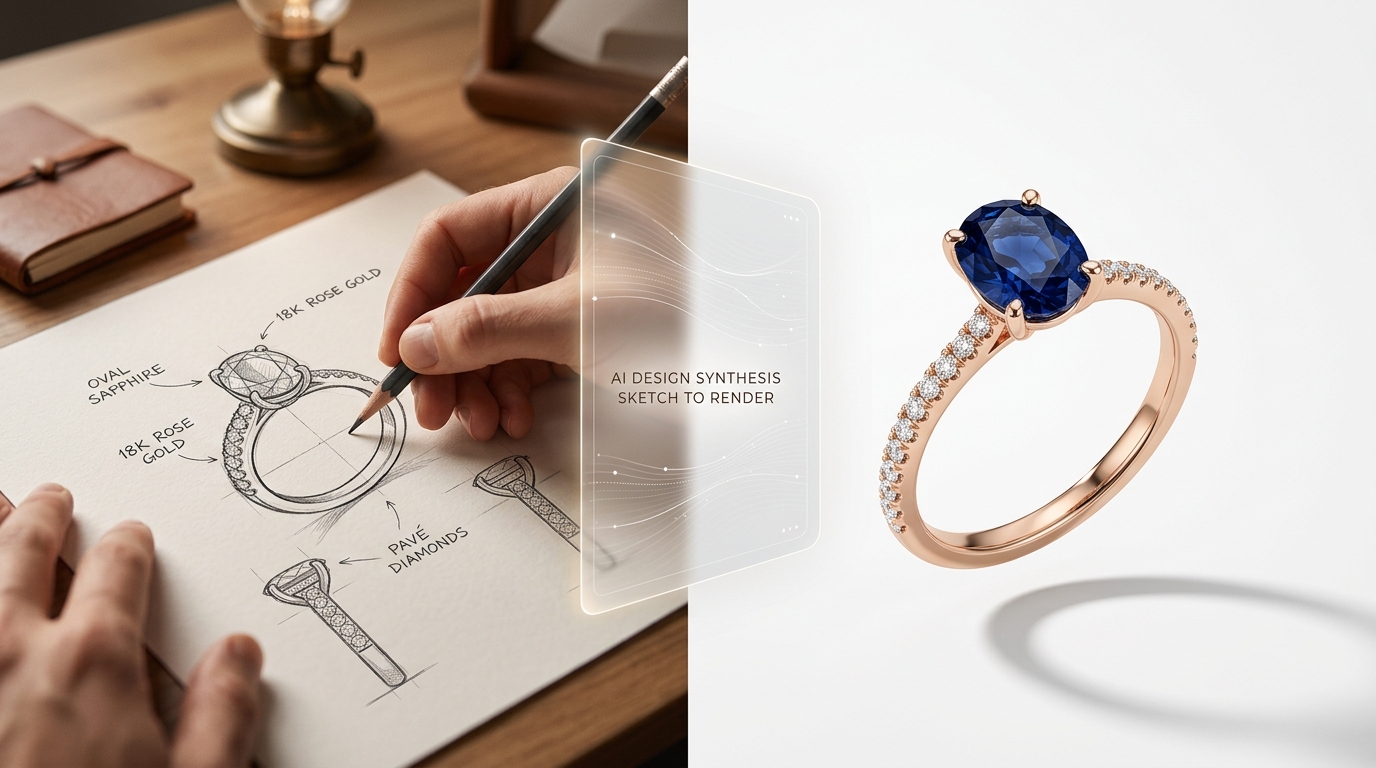
AI jewelry design has moved from curious experiment to practical production tool in the span of a few years. What once required a trained CAD artist, a rendering studio, and days of back-and-forth can now begin with a sentence. This guide covers everything: what AI jewelry design actually is, how the technology works, who's using it and why, a step-by-step workflow using Diatech Studio, and honest answers to the questions designers ask before adopting it.
If you're a working jewelry designer, a design studio owner, or someone who wants to bring a jewelry idea to life without professional design training — this is the resource you've been looking for.
What Is AI Jewelry Design?
AI jewelry design refers to using artificial intelligence — specifically machine learning models trained on jewelry imagery and design data — to generate, modify, and refine jewelry visuals from text descriptions, hand-drawn sketches, or reference photographs.
The output isn't clip art or a rough illustration. Modern AI jewelry design tools produce photorealistic renders: a solitaire ring with a cushion-cut sapphire and rose gold band, a pavé diamond necklace with a crescent pendant, an art deco-inspired earring with geometric motifs. The same image can then be refined, placed on a model, turned into a product video, or exported alongside AI-generated marketing copy.
The key shift from traditional jewelry visualization is speed and accessibility. A trained jewelry renderer might take hours to produce a single polished image. AI does it in under a minute. More importantly, it opens the design conversation to everyone who has an idea but not the technical skills — or budget — to commission traditional renders.
How AI Jewelry Design Works
Understanding the mechanics helps you use AI tools more effectively and set realistic expectations.
Text-to-Image Generation
Most AI jewelry design platforms accept a text prompt and generate an image. The prompt describes what you want: the jewelry type, metal, stone, setting style, aesthetic, and any other details. The AI interprets this description and generates an image that matches it.
The quality of this output depends on two things: the underlying model's training data and how well-calibrated it is for jewelry specifically. A tool trained specifically on jewelry imagery — like Diatech Studio — understands terms like "cathedral setting," "baguette accent stones," "milgrain border," and "oxidized silver" in a way that a general-purpose image generator does not.
Sketch and Reference Image Input
Text prompts aren't the only starting point. You can upload a hand-drawn sketch and have the AI interpret it as a polished render. You can upload a reference photograph — say, an antique brooch from an estate sale — and use it as a style reference. You can upload an existing design and generate variations. This flexibility means the AI adapts to how you already work, rather than forcing a completely new workflow.
Iterative Refinement
AI jewelry design is not a one-shot process. The first generation is a starting point. From there, you describe changes in plain language ("make the band thinner," "change to white gold," "add a halo around the center stone") and the AI updates the design. You can also use targeted edits: select a specific region of the image and apply changes only to that area, leaving the rest intact. This is how AI design gets to a production-ready result — through iteration, not magic.
Technical Specification Mode
Advanced users and CAD artists can work in the opposite direction: specify technical parameters first (stone dimensions, prong configuration, metal weight targets) and let the AI generate a design that matches those constraints. This bridges the gap between creative exploration and manufacturable design.
The Benefits of AI Jewelry Design
For Professional Designers
The biggest productivity gain is in the ideation phase. Instead of spending hours sketching multiple directions for a client meeting, a designer can generate a dozen distinct concepts in an afternoon. Clients can see what they're getting before any CAD work begins — which dramatically reduces the expensive revision cycles that happen after manufacturing starts.
AI tools also make it easier to maintain consistency across a collection. By building a library of prompt formulas that encode your brand's aesthetic, every generation pulls in the same direction. One designer at a mid-size studio can produce output that previously required a team.
For Independent Jewelers and Custom Work
Custom jewelry clients often struggle to articulate exactly what they want. AI design gives them something to react to. Instead of a back-and-forth over verbal descriptions or amateur sketches, a designer can generate three or four options in the initial consultation and let the client choose a direction. The conversation becomes concrete immediately.
For Marketing and E-Commerce
A polished design render is also a product image. With features like background removal, model placement (placing a ring on a hand or a necklace on a model), and AI-generated product videos, a single design session can produce the full asset package a product listing requires. This is particularly valuable for brands launching new collections where professional photography isn't yet available.
For Studios Managing Volume
If you're a design studio managing dozens of client projects or a manufacturer processing hundreds of SKUs per season, manual design workflows simply don't scale. AI batch generation — where you submit a spreadsheet of design briefs and get rendered images back for all of them — turns a week of work into an afternoon.
Who Is AI Jewelry Design For?
AI jewelry design is useful across a wider range of users than you might expect:
Jewelry designers at brands and manufacturers use it to accelerate ideation, reduce reliance on expensive renders, and present more options to clients faster.
CAD artists and technical modelers use it to refine a design brief before committing to modeling time. Getting the visual right in AI first means fewer CAD revision cycles.
Collection managers and brand managers use it to assemble full marketing asset packages — images, copy, pricing — for every piece in a collection without manually producing each one.
Studio and agency owners use it to generate more output per hour, serve more clients, and deliver faster proposals that win new business.
Independent jewelers use it to bring custom order consultations to life, produce content for social media, and show clients realistic previews before making anything.
Jewelry school students and hobbyists use it to explore design ideas that would be too expensive or technically demanding to execute through traditional means.
A Step-by-Step Workflow Using Diatech Studio
Here's how a typical AI jewelry design session looks in practice with Diatech Studio, from a blank page to a presentation-ready result.
Step 1: Start with a Design Brief
You have two options: type a description or upload an image. For a text prompt, be specific. "Yellow gold engagement ring with a 2ct oval sapphire center stone, six-prong setting, and a diamond pavé band" will produce a more accurate result than "pretty ring with blue stone."
If you have a hand-drawn sketch — even a rough one — upload it instead. The AI interprets the sketch and renders it as a polished design, preserving the proportions and character of your drawing.
Step 2: Review and Select from Initial Variations
The AI generates your first design. From here, you can generate multiple variations with a single click, each exploring a different interpretation of your prompt. Browse them in the thumbnail strip and select the direction you want to develop.
Step 3: Refine with Edits
Describe what you want to change. "Make the band more delicate." "Try a princess cut instead of oval." "Add milgrain detail to the edges." The AI applies each change and generates an updated version. You can use the Targeted Edit tool — a lasso selection — to change only a specific part of the design without affecting the rest.
If you need to specify exact technical parameters (prong style, stone diameter, expected metal weight), switch to Technicals mode and enter the specs directly.
Step 4: Generate Marketing Assets
Once you have a design you're happy with, you can:
- Place it on a model photograph for lifestyle imagery
- Generate a short product video (5, 10, or 15 seconds) showing the piece in motion
- Remove the background for a clean product shot
- Upscale and enhance the image to print quality
- Generate AI-written product copy (title, description, selling points) with one click
All of this happens inside the same workspace where you created the design.
Step 5: Estimate Pricing and Build a BOM
The AI can analyze the design image and generate an automatic cost breakdown: metals by weight, stones by carat, and a total estimate. For more precise pricing, you can manually enter specifications or import a Bill of Materials from a CSV file. Your organization's gem rate table feeds into all calculations automatically.
Step 6: Share with Your Team or Client
Add the design to a catalog — a curated collection of pieces — and generate a share link for your client or buyer. They see a full-screen presentation with all the designs, and they can leave annotation comments directly on specific pieces. No login required on their end.
You can also export the catalog as a PowerPoint file for offline presentations, or open the designs in Canva for further creative work.
Step 7: Track the Feedback Loop
All annotation comments from clients and team members are consolidated in the catalog's Activity Feed, so you can see every piece of feedback in one place without hunting through email threads. Assign revision tasks to team members, track progress, and move designs through the review cycle within the same platform.
Comparing AI Jewelry Design to Traditional Methods
| AI Design (Diatech Studio) | Hand Sketching | Traditional CAD Rendering | |
|---|---|---|---|
| Time from idea to visual | Minutes | Hours to days | Hours to days |
| Design iteration speed | Instant | Slow | Slow and expensive |
| Skills required | Low — natural language | High — drawing skills | High — CAD software training |
| Cost per design | Low | Varies by designer | Varies by renderer |
| Client presentation quality | Photorealistic | Varies | Photorealistic |
| Batch production | Yes (CSV, Agent Mode) | No | No |
| Team collaboration | Built in | No | No |
| Marketing assets included | Yes | No | No |
AI design doesn't replace hand sketching as a creative thinking tool — many designers still sketch to think, then use AI to render. And it doesn't replace CAD for the final, production-approved model that goes to manufacturing. What it replaces is the expensive, slow middle layer: all the rendering and visualization work that happened between an idea and a go-ahead.
Common Use Cases
Engagement Ring Design
Engagement ring clients often have a vague vision — "vintage-inspired, with a yellow diamond" — but no way to communicate it precisely. AI design turns the consultation into a collaborative visual session. Generate options based on what the client describes, refine based on their reactions, and hand off an approved design brief to the CAD artist with clarity on every detail.
New Collection Development
Launching a new collection means generating a large number of designs quickly, refining the strongest ones, and producing complete marketing assets for all of them. AI design compresses the ideation phase from weeks to days and produces marketing assets as a by-product of the design process.
Client Proposals for Custom Work
Design studios presenting to clients can generate proposal decks in hours rather than days. Use Agent Mode to brief multiple design directions at once, review the outputs, curate the best into a catalog, and share a presentation link before the client's next meeting.
Social Media Content
Independent jewelers need a consistent stream of high-quality images for Instagram, Pinterest, and other visual platforms. AI-generated lifestyle images — ring on hand, necklace on a model — provide professional-quality content without a photography budget.
Exploring Trend Directions
At the start of a season, design teams can use AI to explore broad trend directions quickly — art deco revival, nature-inspired organics, minimalist stacking sets — and narrow down to the ones worth developing further before committing any production resources.
Frequently Asked Questions
What is AI jewelry design? AI jewelry design is the use of artificial intelligence to generate and refine jewelry visuals from text descriptions, sketches, or reference images. It produces photorealistic renders that can be used for client presentations, marketing materials, and design development.
Do I need any design experience to use AI jewelry design tools? No. The main input is a text description. If you can describe what you want — "rose gold ring with a pear-shaped emerald and leaf motifs on the band" — the AI can generate it. Design experience helps you iterate more effectively, but it isn't required to get started.
Can AI jewelry design tools produce images good enough for client presentations? Yes. Diatech Studio produces photorealistic renders that are used in professional client presentations, lookbooks, and buyer meetings. With the image enhancement and upscale tools, outputs are print-quality.
Does AI replace jewelry CAD software? Not for production. CAD software like Rhino or 3Design produces manufacturable 3D models with precise tolerances. AI design tools produce visualizations. The two phases complement each other: design in AI until the concept is approved, then build the production CAD model. Diatech Studio's AI-to-CAD feature (available on Enterprise) can generate a 3D model from a design image to accelerate this transition.
What's the difference between Diatech Studio and tools like Midjourney? Midjourney is a general-purpose image generator. It produces beautiful images but has no understanding of jewelry-specific concepts, no project management, no team collaboration, no BOM tools, and no client presentation layer. Diatech Studio is purpose-built for jewelry professionals: jewelry-specific AI, a full team workflow, annotation and review tools, catalog presentations, pricing, and marketing asset generation — all in one platform.
What's the difference between Diatech Studio and BLNG? BLNG focuses on design generation and marketing asset production for individual creators. It's a strong creative tool but lacks team collaboration, annotation workflows, catalog presentations, BOM/pricing, and batch generation. Diatech Studio covers the entire workflow from first idea to client presentation and production handoff — and is built for teams, not just individuals. BLNG's free tier is also significantly more restrictive: 3 design files maximum with no commercial rights.
Is there a free tier for Diatech Studio? Yes. Diatech Studio offers a free tier that lets you start designing immediately. Unlike BLNG, which caps free users at 3 design files with no commercial rights, Diatech's free tier is built to let you explore the platform's core capabilities meaningfully.
How does AI jewelry design handle technical specifications? Through the Technicals mode in Diatech Studio, you can specify precise parameters — stone dimensions, prong style, metal weight targets — and generate designs that match those constraints. You can also add an AI-generated pricing estimate and build a full Bill of Materials within the same project.
Can I use AI design tools for batch production of large catalogs? Yes. Diatech Studio's bulk CSV jobs let you upload a spreadsheet of SKUs with design briefs and generate rendered images for all of them in one batch. Agent Mode handles multi-direction generation in the background while you continue working. This scales to hundreds of SKUs per session.
Is AI-generated jewelry design commercially usable? Yes, with Diatech Studio. Generated designs are yours to use commercially. This is in contrast to tools like BLNG, where commercial rights are not included on the free plan.
How to Write Better Prompts for AI Jewelry Design
The difference between a mediocre AI result and an accurate one usually comes down to prompt specificity. Here's what to include and how to think about it.
Name the jewelry type first. Start with a clear category: ring, necklace, bracelet, earrings, brooch, pendant. The AI uses this to set proportions and context correctly.
Specify the metal and finish. "Gold" is vague. "18k yellow gold with a satin finish" gives the AI everything it needs. Options include white gold, rose gold, yellow gold, platinum, sterling silver, oxidized silver — and for each, you can specify purity (18k, 14k, 9k) and finish (polished, matte, brushed, hammered, satin).
Describe the stone precisely. Name the stone type (diamond, sapphire, emerald, ruby, opal), shape (round brilliant, oval, cushion, princess, pear, marquise, emerald cut, asscher, heart), approximate size, and color if relevant ("vivid blue sapphire," "salt and pepper diamond," "icy white oval").
Call out the setting style. Prong (4-prong, 6-prong), bezel, pavé, channel, tension, burnish, flush — these make a significant difference to the final look and specifying one gets you closer on the first generation.
Name the aesthetic or period. Art deco, Victorian, Edwardian, mid-century modern, minimalist, organic/nature-inspired, maximalist, brutalist. These are loaded terms in jewelry design and the AI understands them.
Add detail and texture references. Milgrain borders, filigree work, engraving, hammered texture, granulation, twisted wire — if you know what you want, name it.
A well-formed prompt might look like this: "18k rose gold engagement ring, oval-cut champagne diamond center stone approximately 2ct, six-prong setting, diamond pavé half-band, low-profile setting, vintage-inspired with milgrain edge detail, warm and romantic aesthetic."
Compare that to "rose gold ring with diamond" — both are valid prompts, but the first will get you much closer on the first generation and require fewer refinement rounds.
Getting Started with Diatech Studio
Diatech Studio is free to start. You don't need a credit card, a design background, or a team. Visit studio.diatech.ai and start with a prompt.
If you're a solo designer, begin with the engagement ring or custom piece workflow described above — type a description and explore the first round of variations. If you're a team lead or studio owner, look at the catalog and team sharing features: those are where the platform's depth becomes obvious.
The learning curve is shorter than you'd expect. The harder part is usually writing prompts that get close to what you have in mind. The more specific you are about metal, stone, setting style, and aesthetic inspiration, the closer the first generation will be to what you're after.
AI jewelry design is no longer a novelty. It's a real production tool that serious designers at brands, studios, and manufacturers are using to work faster, serve clients better, and produce more. The question for 2026 isn't whether to adopt it — it's which platform fits how you work.